How to Choose an Activity for After a Meevee Play Session
This guide shows you how to set an activity for your child to do after their Meevee screen time ends. Setting an expectation for what comes next helps create a smooth, positive transition away from the screen. You can choose this activity each time you start a new session.
After setting up a session, Mookee will ask you for the amount of time and the after session activity.
In the New session window that appears, find the section titled WHAT COMES AFTER?.
Choose one of the suggested activities, like Going outside, Reading a book, or Fun chores together.
If you have a different activity in mind, you can type your own in the message box below the suggestions.
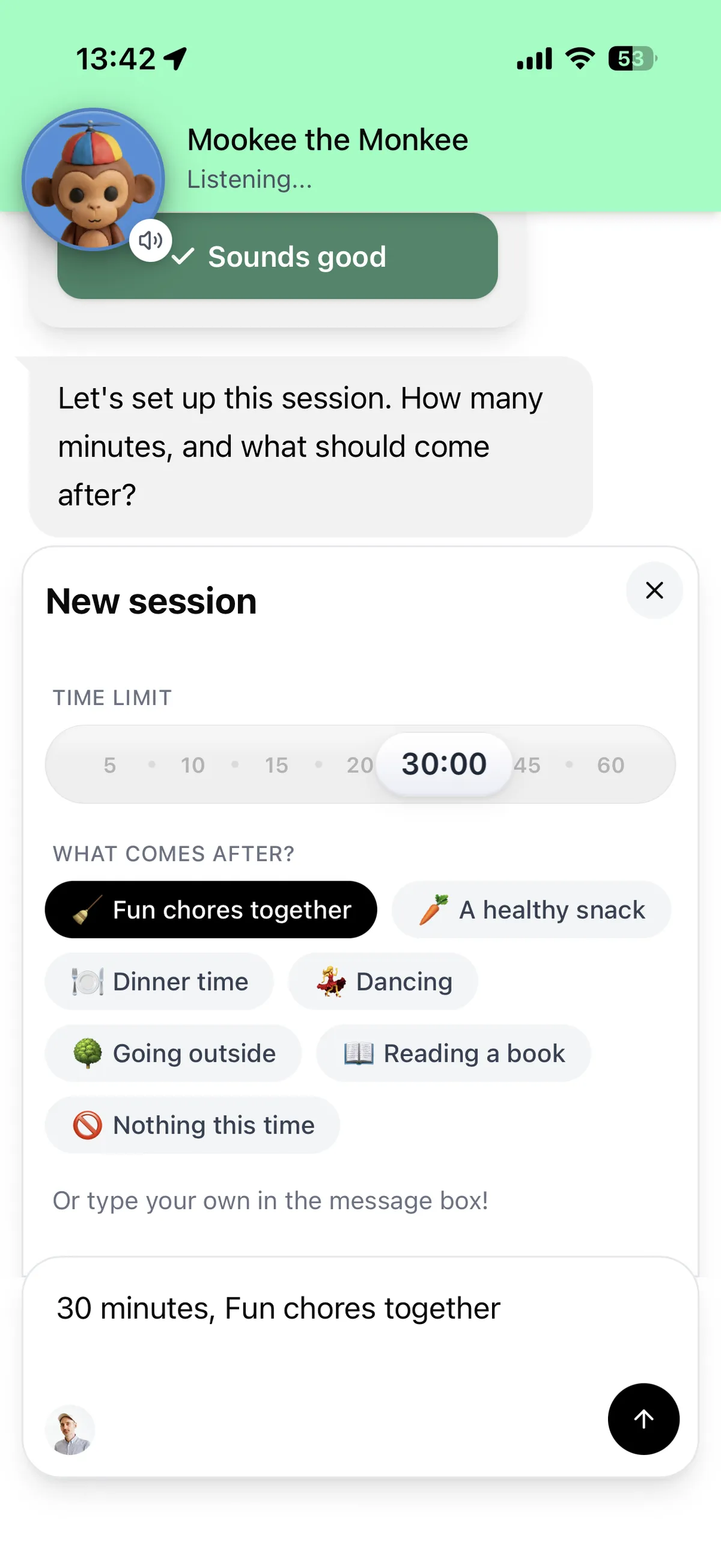
Click the send button (up-arrow icon) to confirm your selection. Mookee will let your child know what the plan is when their session is about to end.
Summary
Meevee helps you set clear expectations for what happens when screen time is over. This feature allows you to choose from a list of suggested off-screen activities or create your own. By communicating the next activity to your child, Meevee facilitates a smoother transition from digital play to real-world engagement.