Try Meevee
Try Meevee
← All articles
Getting Started with Meevee
  • Create Your Meevee Account
  • How to Add Your Child's Profile and Interests
  • Pair a Second Device for Your Child to Play On
  • Set Up Your Parent and Family Profile
Managing Play Sessions
  • How to Access Parent Controls During a Live Session
  • How to Choose an Activity for After a Meevee Play Session
  • How to Enable Push Notifications
  • How to Set a Screen Time Limit for a Play Session
  • How to Start a New Play Session
  • Review the Post-Session Summary
The Child's Experience
  • How Sessions End with the Wind-Down Routine
  • How the Hourglass Timer Works
  • Interactive Brain-Breaks: Puzzles, Coloring, and Games
  • Understanding the Child's Playspace
Customizing Your Account
  • How to Change Your Name and Profile Picture
  • How to Manage Your Meevee Membership Plan
  • How to Upload Family Photos for Personalized Games
  • Update Your Child's Interests and Milestones via Chat
Feedback and Support
  • Contact Support
  • How to Delete Your Meevee Account
  • How to Log Out of Your Meevee Account
  • How to Send Feedback or Report an Issue via Chat
Help / Managing Play Sessions

Review the Post-Session Summary

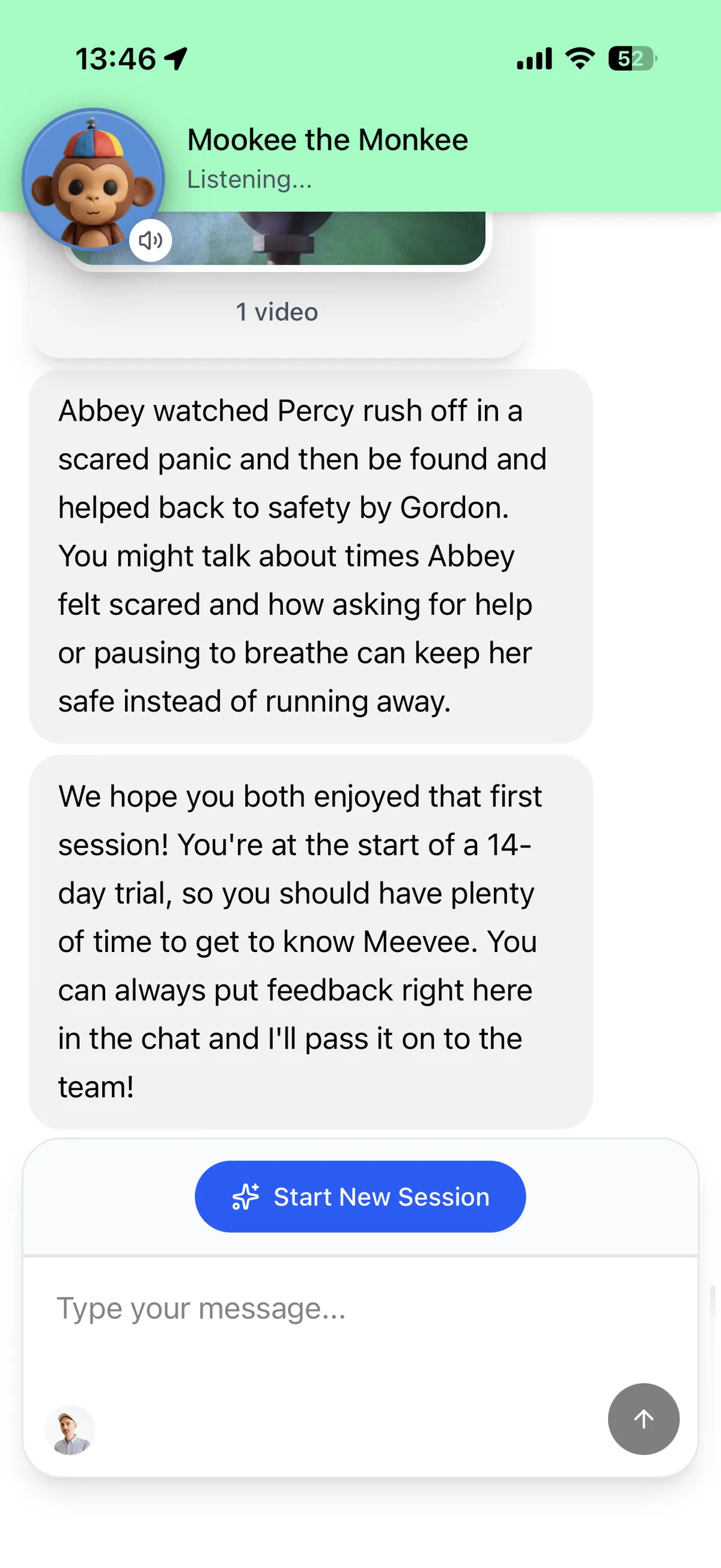
After your child completes a play session, Mookee sends a detailed summary directly to your chat. This summary provides a quick and insightful recap of the videos and activities your child engaged with, helping you stay connected to their screen time experience.

What’s in the Summary?

The post-session summary is designed to be more than just a list of viewed content. It breaks down the session into key components to give you context and talking points.

  • Content Watched: A gallery of thumbnails shows you exactly which videos your child watched during the session.

  • Key Takeaways: Mookee provides a short, narrative summary of the educational or emotional lessons from the content. This helps you understand what your child was exposed to and can be a great conversation starter.

  • Activities Completed: The summary also lists any interactive brain-breaks your child completed, such as coloring pages, puzzles, or memory games.
Tips for Using the Summary

Use the Key Takeaways as a starting point for conversations with your child. Ask them about their favorite part of the story or how the characters solved their problems to reinforce the learning from the session.

Summary

The post-session summary is an automated report delivered to your chat after each play session, detailing the videos watched and activities completed by your child. It offers valuable insights into the content’s educational themes, providing parents with a clear overview and creating opportunities to engage with their child about what they learned.

Related

  • Start a New Play Session
  • How Sessions End with the Wind-Down Routine
  • Update Your Child’s Interests and Milestones via Chat

Last updated: 7 May 2026

Previous How to Start a New Play Session Next How Sessions End with the Wind-Down Routine
Screen Time That Ends Well
  • Made for Parents
  • Curated Content
  • Made for Kids
  • Built with Care
  • Testimonials
  • Membership
  • Blog
  • Help Center
  • The Meevee Story
  • Our Team
  • Careers
  • Parent Guides
  • Printables
  • Content Standards
  • FAQs
  • Support
  • Privacy
  • Terms of Service
  • Press Kit
  • Contact Us
  • For Distributors
  • For Creators
  • Meevee for iOS
  • Meevee for Android
  • Meevee for Smart TV
© COPYRIGHT MEEVEE B.V. 2026